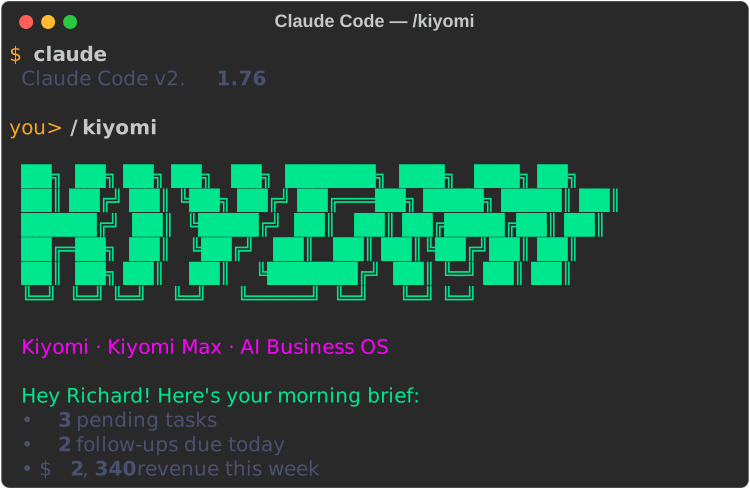
Turn Claude or Codex into your business operating system.
Your AI tool is powerful but generic. Install Kiyomi Max and it becomes yours.
🎭
Personalized AI
Kiyomi knows your name, your business, your clients, and your preferences. Not a blank canvas — a business partner that understands your operation from day one.
🧠
Persistent Memory
SQLite database that survives every session. Personas remember your contacts, preferences, project details, and past conversations. They get smarter over time.
🚀
Instant Activation
In Claude, type /kiyomi. In Codex, type run kiyomi max. Your AI business partner comes online without replacing your normal workflow.
📋
Non-Destructive
Kiyomi Max doesn't replace your existing setup. No hooks, no strange patching, no permanent mode switch. Use Claude or Codex normally, then launch Kiyomi Max when you want the business operating system.
📁
11 Business Skills
Pre-loaded skills for invoicing, client management, financial tracking, proposals, reports, email templates, scheduling, and more. Like hiring a team — without the payroll.
🔄
Always Improving
New personas, tools, and features added continuously. All future updates included — forever. You bring your own Claude or Codex access.
Pricing
Your AI business partner. $149 once.
Pay once. Own it forever. No subscriptions.
Lifetime
$149 once
Pay once. Own it forever. No subscriptions.
✓ Activation in Claude or Codex
✓ Personalized AI that knows your business
✓ Persistent SQLite memory across sessions
✓ 11 pre-loaded business skills
✓ 12 industry blueprints built in
✓ Custom persona names — make her yours
✓ Non-destructive — doesn't replace your existing setup
Try it risk-free. Not for you? Full refund, no questions asked.
Works with Claude or Codex. You provide your own access.
Setup in 5 Minutes
Buy. Install. Launch.
1
Choose Claude or Codex
Kiyomi Max runs inside your existing Claude or Codex workflow. If you want the desktop route, download Claude Desktop at claude.ai. If you already use Codex, you can stay there.
Purchase above and check your email. You'll receive a one-line install command. Run it in Terminal on Mac or PowerShell on Windows. Kiyomi Max installs your AI business partner, memory database, and business skills in under 2 minutes.
Check your email for your install command
3
Launch
After the install finishes, open the tool you use every day. In Claude, type /kiyomi. In Codex, type run kiyomi max. Kiyomi Max will load memory and get to work.
Claude: /kiyomi · Codex: run kiyomi max
4
Customize
Give her a name: Start Kiyomi Max as Sarah. Different names = different personas, same shared memory. Your regular workflow stays completely untouched.
Claude Desktop vs Kiyomi Max
Feature
Claude Desktop
Kiyomi Max
Personalized AI identity
✗
✓
Persistent memory across sessions
✗
✓
11 business skills pre-loaded
✗
✓
Custom persona names
✗
✓
Autonomous business mode
✗
✓
Non-destructive (doesn't touch your setup)
—
✓
MCP server support
✓
✓
Included
12 Industry Blueprints. Built In.
Tell Kiyomi Max your industry. It automatically loads your pricing tables, terminology, and workflows. No extra cost — every blueprint is included with your purchase.
Kiyomi Max is the Claude and Codex path. KiyomiKode and Kiyomi Desktop stay available for customers who want the terminal product or the standalone Mac app.
Main homepage offer
KiyomiKode
The CLI version for builders who want the terminal workflow and the fastest path to coding, scripts, websites, and automation.